
Bleed Explained
Bleed Explained
When designing anything for print—like business cards, postcards, flyers, or brochures—it's important to understand how bleed works. Bleed ensures your final product has edge-to-edge color or background, with no unexpected white borders.
What is Bleed?
Bleed is a margin of extra artwork that extends beyond the final trim size of your print product. It's trimmed off during finishing, allowing the background color or image to run fully to the edge of the paper—even if the cut shifts slightly.
At Sunrise Press, we use highly precise cutting equipment, but even with top-tier machinery, a fraction of a millimeter of movement is normal. Including bleed ensures your design looks perfect every time.
Three Key Zones You Should Know
- Bleed Area (Black Outline): This extends 0.125" beyond the trim line on all four sides. It will be cut off after printing, so use it only for background elements—not text or important graphics.
- Trim Line / Actual Size (Green Outline): This is your final printed size. For example, a standard business card trims to 3.5" x 2".
- Safe Zone (Cyan Outline): Keep all essential text, logos, and graphics at least 0.125" inside the trim line. This ensures they stay intact even if the cut shifts slightly.
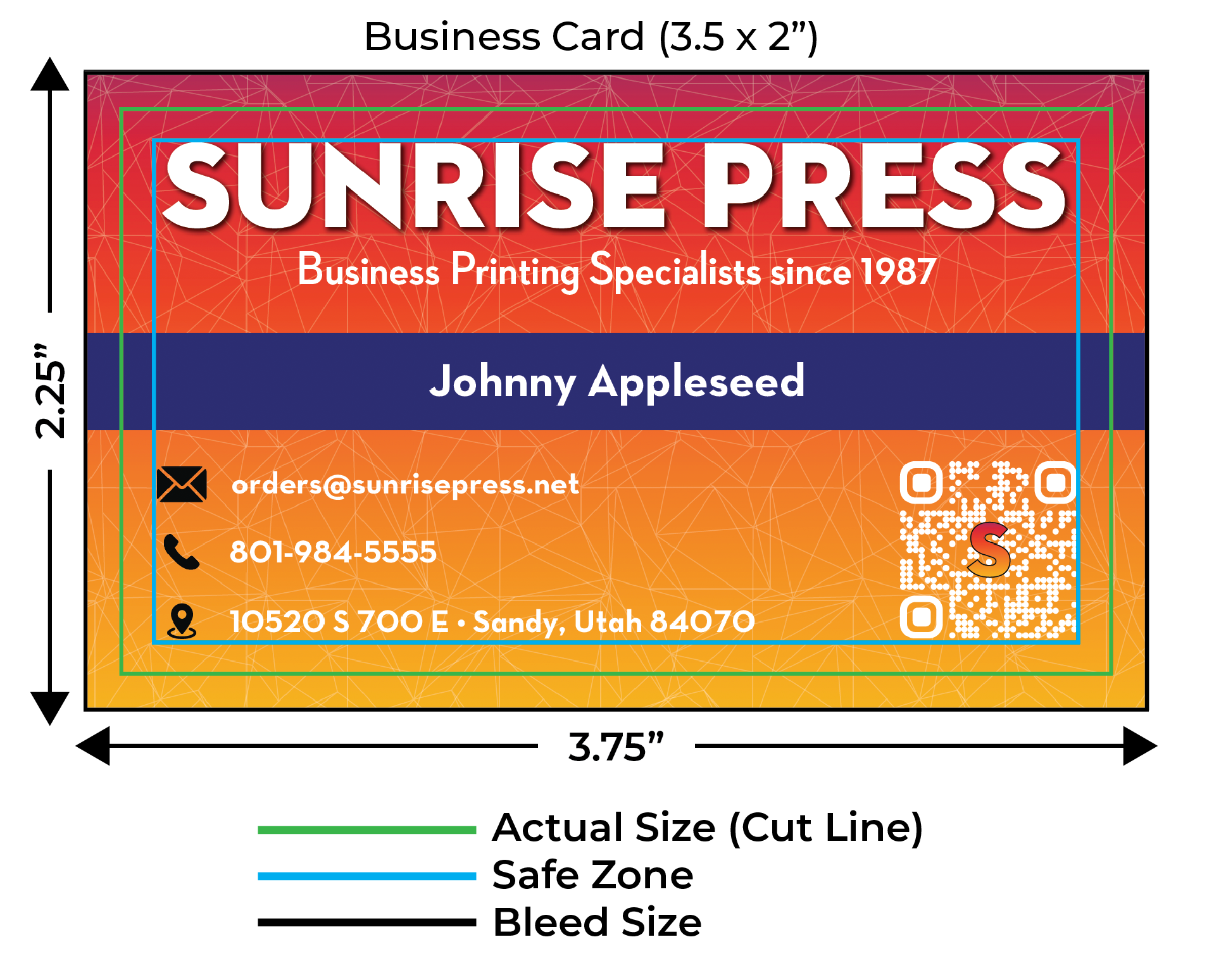
Example: Business Card Sizing
Let’s say you’re designing a business card:
- 3.5" x 2"
- With Bleed: 3.75" x 2.25"
- Safe Zone: 3.25" x 1.75"
Your design file should be created at 3.75" x 2.25", with all critical elements inside the 3.25" x 1.75" safe zone.
Common Mistakes to Avoid
- No bleed included: Results in white edges if the cut shifts.
- Text too close to the edge: Can be trimmed off or appear uneven.
- Important graphics in the bleed: These will be cut off—don't place logos or text here.
Tips for Setting Up Bleed
- Set your design size to be 0.25" larger in both width and height than the final size.
- Use guides to mark the trim and safe zones.
- Export your file with bleed settings enabled (PDF with bleed marks if possible).
Need Help?
We’re happy to review your files or set up the bleed for you. Just reach out at orders@sunrisepress.net and our team will guide you through it.